Painted Day
iPhone · iOS 26+

Your day,
painted.

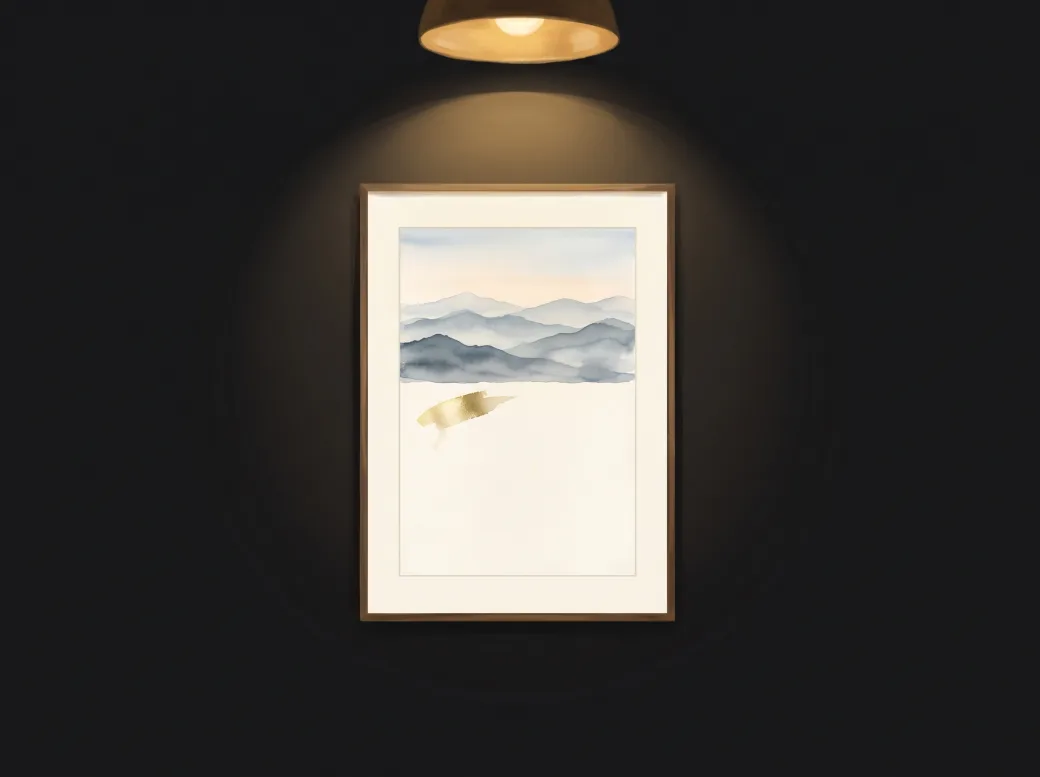
Painted Day is a painting that paints itself across your day. The canvas is blank when your day begins and, stroke by stroke, the work is complete when it ends. Tap it to keep a moment in gold leaf; when the day closes, the painting is signed and hangs in your gallery.

Coming soon to theApp Store See features
  • A new painting every day
  • Drawn on your iPhone, no AI
  • No account, no ads
Painted Day: today's painting on a dark gallery wall under a warm lamp, a watercolor of misty blue mountains half painted, with a fleck of gold leaf marking a moment on the blank half of the canvas

A clock that doesn't look like one

How much of the painting is done is how much of your day has passed — you can tell at a glance, without a single number.

🖌️Painted live, stroke by strokeAn invisible brush paints in real time, so there is always a stroke in progress. Open the app in the middle of the day and the painting catches up in a few seconds.
✨Keep a moment in gold leafTap the painting and a fleck of gold leaf lands where the brush was, with its time and an optional one-word note.
🖼️A gallery of your daysWhen your day closes, the painting is signed with its number and date and hangs in a calendar of finished works, with the moments of that day.
🎨Six ways to paintWatercolor and Ink take turns each day. Pointillism, Loom, Cross-stitch and Color fields join with the Complete Atelier, along with choosing the style of each day.
🎞️An image or a timelapseExport the painting as an image, or as a 15-second vertical timelapse of it painting itself, then share it or save it to Photos.
📱Today's painting at a glanceA widget in small, medium and large sizes — the small one also in StandBy — shows how far today's painting has come without opening the app.

The story behind Painted Day

A clock tells you what time it is. It rarely tells you how much of your day you have already lived.

Painted Day makes the day visible. You set your hours — 8 AM to 10 PM by default — and a painting fills them: at 3 PM it is half done, and at the close of your day it is complete. Each painting comes from that day's date and a random seed kept on your iPhone, so no two days look alike, and an update never changes a painting you already have. Every stroke is drawn by the app's own algorithms on your iPhone — no AI, no cloud.

It is made to stay on a stand next to your desk: the screen stays awake while the painting is open, the controls hide on their own, and turned sideways the painting hangs framed on a gallery wall next to its museum label. No account, no ads. In English, Spanish and Brazilian Portuguese. Made in Mexico by Christian Irack at Ingeniería.dev.

Free to download — one optional purchase, no subscriptions

Painted Day downloads at no cost with Watercolor and Ink, which take turns each day, plus moments, the gallery, the widget, image export at 1080 px and the 15-second timelapse with a discreet "Made with Painted Day" mark. Complete Atelier — $4.99 USD, one-time (a non-consumable In-App Purchase) adds four styles — Pointillism, Loom, Cross-stitch and Color fields — lets you choose the style of each day, and unlocks 4K image export and timelapses without the mark. Pay once, keep forever. No subscriptions, no ads.

The purchase is handled by Apple through your Apple Account, can be restored at any time with Restore purchase (on the Complete Atelier screen and in Settings), and supports Family Sharing. Full details in the Terms and Support pages.

Legal & support

Today's canvas is waiting

Set your hours, put your iPhone on its stand and watch the first strokes arrive.

Coming soon to theApp Store

Ingeniería.dev — Christian Irack · [email protected]